Showing posts with label IT in daily life. Show all posts

Monday, March 2, 2015

Access blocked websites on work / office laptop with ssh tunnel to AWS cloud instance

Given the propensity of IT admins to block websites, using office laptops at home can be a very frustrating experience. While blocking certain malicious/nsfw websites definitely makes sense, I could never understand the logic behind blocking very useful blogs/discussion forums etc.

Now that our aim is clear, let’s get started. We need the following:

  • An open SSH port (port 22) on your laptop (on my work laptop, it’s blocked on office network but open on home/personal networks)
  • A credit card (required for AWS account)
  • A new Amazon AWS account (which comes with access to AWS free tier for a year)
  • A ssh client (e.g putty.exe on windows)
  • FoxyProxy plugin for chrome/firefox browser


The basic principle behind how it works:


Let’s go step by step, configuring the AWS instance, putty client and browser. Since this is  a guide meant for ‘power’ users, it would be better to skip step by step details:

Set up Amazon AWS
Set up AWS by following this guide and then launch an instance by following this guide.
Remember that the instance type you launch should be T2 micro instance if you want it to be free. When adding inbound traffic rules in security groups, allowing only SSH (from anywhere) would be enough.  For now, skip the part about connecting to the instance, it’s described in the next step below.

Set up SSH Client (putty)
Now that we have a Linux server running in the AWS cloud, we will configure Putty on our local machine to connect to the server. Follow instructions at connecting to AWS instance , ignore the “transferring files” part but before saving the session for future use, go to Conection->SSH->Tunnels and add new forwarded port with Source port: 8080, Destination: leave text field empty, Dynamic and Auto.

We now have a ssh client connected to our AWS instance, ready to pass our browsing data to the AWS instance in a secure manner, bypassing IT controls e.g Websense. We just need to tell our browser to how to pass the browsing data to the ssh client.

Set up Browser
We will use chrome/firefox because of their support for exceptional plugins. You might want to configure an alternate browser(other than what you regularly use) for this purpose.
Add FoxyProxy(basic version will do) to the browser. Now in FoxyProxy settings, change the default proxy settings (or add a new setting) to: Manual Proxy enabled, Host: localhost, Port: 8080, SOCKS proxy enabled. Enable FoxyProxy with the new settings.

That’s it, happy freedom to you! Browse whatever you want to your heart’s content. Remember to check back and stop the AWS instance after a year.
Since AWS instance is always on, so the only things you need to check before doing secure browsing is that Putty is connected to AWS instance and FoxyProxy is enabled in your browser.

Thursday, November 21, 2013

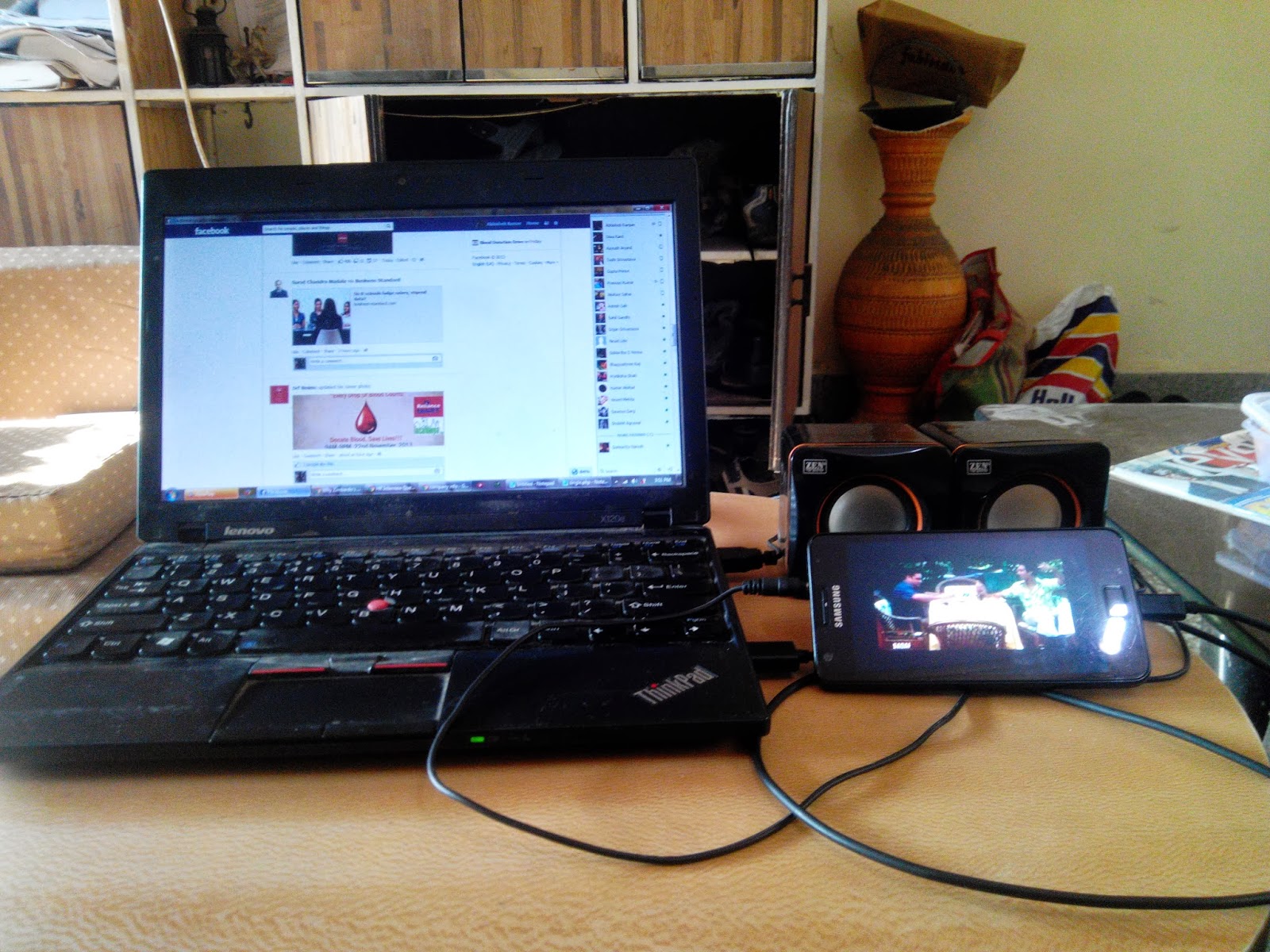
Your smartphone has got a gorgeous screen. Why not make some use of it? (Image)


My laptop has a 11.6 inch screen and my smart phone has a 4.3" screen (I am sure your phones have a larger screen). While I don't have any complaints with my laptop's screen, my phone's screen is a gorgeous SUPER AMOLED ( Retina display will also do :P ). 
So why not make some good use of the gorgeous display? Ok, I used it as a an auxiliary screen for watching YouTube but it's a good way to watch videos, simultaneously doing something meaningful on the laptop.

While I would have loved this:

I guess, this will also do :D


Monday, November 18, 2013

How badly do we depend on mobile and online services! (Image)

Technology has changed our lives and the way we use technology has changed too!
Our mobile phones (not desktops or laptops) connect us to our online world.  And boy! The online services have literally stormed our lives. We now make calls, send messages, watch videos, listen music, read news, connect with friends, store and share our photos and much more... all online.
What else online services do you use on your phone?
P.S this entire post was done on a smart phone right from screen shot to picture editing to content writing.

Thursday, November 14, 2013

Why custom ROMs for android phones are like Chinese toys!

CyanogenMod, a popular custom ROM for android phones

Ok, I will admit it. I am tired of changing custom android ROMs on my Samsung Galaxy SII. I am running custom ROM and I am unable to boot my phone since last 2 days. Which ROM is giving me the sweats? Well, it doesn't matter. I have tried CyanogenMod, Slim Bean, MIUI and many more(these are the latest that I have tried, I cannot remember many others). Some are fast, some are customizable, some have unlocked features, some are based on a version of android which is not yet available for SII and increasingly all of them claim to be jack of all trades.

Installing custom ROMs has become increasingly easy. First, it required special software(e.g odin) to flash custom ROMs on your phone but now, once you have rooted your phone, it's as simple as downloading and installing from a zip. Custom ROMs can be installed as easily as themes!

But not without their own set of issues. First, rooting(required for installing custom ROMs) still requires some level of confidence about your computer skills and rooting voids warranty of phone. Even if you are confident enough, there are scores of custom ROMs for your phone out there( http://forum.xda-developers.com/  is a good repository) and choosing one among them is a matter of blind faith. Many of the ROMs are made by enthusiasts who offer absolutely no support and in my experience, most of them vanish after one or two release. This has been remedied to an exten with the emergence of well maintained ROMs like CyanogenMod and Slim Bean which even after updtaes but point to note: my phone ran on Slim Bean and it refused to boot after a well intended update :|

Not everybody has the heart to stay without his/her smart phone in case something goes wrong while installing a custom ROM(it does go wrong 5/10 times) and re-install all favorite apps after every install. Besides, performance improvement through custom ROMs doesn't matter much on a capable phone like SII (I have hardly noticed a big difference in performance on a custom ROM) and if you consider the argument, no enthusiast ROM developer can really know your phone better than the company which made it! Besides, my friend is always particular to point out the security issue arising from installing custom ROMs: what if its code includes a backdoor to sneak out all of your confidential information? If Apple can do it, enthusiast developers can go all the way stealing your information!

If you are excited about custom android ROMs, by all means go for it but remember; they are like Chinese toys which appear to be pretty good but do not last long . Sooner or later you will come back to original ROM which came with your phone!

Monday, November 4, 2013

MOOCs(e.g Coursera): the next best thing on the web after Facebook!

MOOC: Massive Open Online Course
Certificate from Coursera(a platform offering MOOCs)
Online tutorials aren't a new addition to internet by any means. Many of us have taken up online tutorials sometime or the other. However these online courses were hobbyist by nature; they were all of different format/structure, scattered all over the internet; they addressed some niche field of study(generally related to computers); lacked any popular recognition and almost entirely lacked human touch(they were completely automated).

First, online courses were just text or videos followed by set of quizzes (e.g www.w3schools.com). Then, MIT pioneered the practice of putting many of it's credit courses as freely accessible online modules through the OpenCourseWare program (http://ocw.mit.edu/)[and thus online Tutorials became online Courses]. Many followed suit, including our own IITs and IISc(http://nptel.iitm.ac.in/). OpenCourseWare had the backing of MIT(no hobbyist!), it was a central repository of MIT's courses, all courses had a similar structure and the courses covered topics from several different fields of study. However, it still lacked something.

Enter the MOOCs on the stage. My experience is almost entirely with www.coursera.org (Coursera, founded 2012), the most popular MOOC platform(there are several others including Udacity, EdX). MOOCs are similar to any other online course except that:

  • Each course is delivered by an Instructor who is affiliated to a University.
  • Course is delivered through a series of lecture videos designed specifically for online learners(it's generally NOT a online copy of real world course)
  • The course runs in a limited time window(e.g 14 weeks, much like a semester). The material becomes available one week at a time, as the course progresses and the assignments have to be completed within a fixed deadline to receive credits for it.
  • Several(sometimes lakhs) of people take the course simultaneously in the limited window and they interact(discuss doubts, ask questions) on discussion forums associated with the course.The discussion forum is moderated by Teaching Assistants.
  • On successful completion of course, participants receive a certificate signed by the instructor(subject to attaining sufficient credits). Certificate bears the name of Instructor and the name of University which offered the course.


What I like about MOOCs:

  • EXCELLENT course material and fabulous instructors. Just consider some of the instructors whose courses I have taken till now:
         Bill Howe, Director of Research, Scalable Data Analytics,University of Washington
         Andrew Ng, Director of the Stanford Artificial Intelligence Lab, Stanford University
         Scott Plous, Professor of Psychology, Wesleyan University
         Dan Ariely, Professor of Psychology and Behavioral Economics, Duke University

  • Most of the courses are designed for "life long learners" i.e they have minimal prerequisites.
  • The discussion forums are lively and meaningful (probably because of good moderation). I have myself got into debates(sometimes hot) several times!
  • The Certificate :) And the best part is, people have said in forums that the courses actually helped them change their major field of employment!


Brick and mortar schools and colleges have already started accepting credit earned from MOOCs (http://www.skilledup.com/blog/coursera-certificate-whats-it-worth/). When are you doing a MOOC?

Friday, November 1, 2013

Stuck with slow slow internet on PC? Some things you can try!

So you went home for vacations and were banking on your mobile / dongle's internet pack for internet access. The slow internet might be just ok on your mobile phone but it's absolutely frustrating on your PC (laptop / desktop). But now you are stuck with snail paced internet which is ruining your vacations?

Try the steps below to have a relatively primitive but better experience of internet on your PC:

1. install  the plugin "User-Agent Switcher" for your PC's browser (Chrome/Firefox ) and change the user-agent of your browser to iPhone (Nowadays almost all popular websites are designed to deliver different optimized versions for different devices. The user-agent of your browser tells the website server the type of device which is requesting the website. Through this step, we are basically trying to trick the websites you will be visiting into thinking that you are visiting them from an iPhone so that server sends a version of the website optimized to be simpler and faster to load i.e pages with compressed images). The plugin can be found at:
https://addons.mozilla.org/en-US/firefox/addon/user-agent-switcher/ (firefox)
https://chrome.google.com/webstore/detail/user-agent-switcher-for-c/djflhoibgkdhkhhcedjiklpkjnoahfmg  (chrome)


2. the above steps should ensure that mobile versions of websites are loaded but if it doesn't for some reason, try manually using mobile versions of websites ( e.g m.facebook.com instead of www.facebook.com)

3. use versions of websites without https (SSL) e.g use http://www.google.co.in instead of https://www.google.co.in

To get back to normal browsing, set user-agent back to your browser's default (e.g Chrome->default if you are using Chrome).

Tuesday, October 29, 2013

Micromax: the Indian Samsung?

Micromax is all over the news(and ads); its flagship phone Canavas Turbo became available for preorder on 26th October.

Canvas Turbo has top notch specs and dashing looks, neck to neck with flagship phones of all popular brands out there in Indian mobile handset market, not to mention that Micromax has roped in Hugh Jackman as it's brand ambassador. And more important is the fact that Canvas Turbo can't be written off as a fluke because Micromax has done it before with Canavas, Canavas HD and Canavas Doodle (As per IDC report, Micromax was only second to Samsung going by total number of smart phone units sold in Quarter2, 2013).

Micromax Canvas Turbo
Samsung Galaxy S4


At a broad level, Micromax story is eerily similar to Samsung story. Samsung started as an underdog(HTC was the top android phone maker at the beginning of android story) with low end phones and then hit the jackpot with Galaxy series phone. Once at the front of the line, Samsung maintained its lead, refreshing the Galaxy line and adding more variants to it and the rest as we all know is history. Samsung has had a great run from Galaxy S to Galaxy S4 and Galaxy Note to Galaxy Note3 (it announced a record profit of $9.96 billion in July-September, 2013) and hopefully will continue. Micromax started as an underdog with cheap re-branded Chinese phones in the low-end segment, steadily moved up the value chain and hit the jackpot with it's Canvas line of android smart phones. Since making it big, Micromax has continuously refreshed Canavas line to bring it closer to flagship handsets of well known brands at that time and has adopted well thought ad campaigns to shed its image of a company assembling and selling Chinese phones.

If Samsung is guilty of making iPhone knock offs(at least in initial stages), Micromax is guilty of making Samsung knock offs. Samsung tried(successfully) to match the features of each new iteration of iPhone(and by some accounts, it still does the same) at lower price point, Micromax is playing catch up with each new iteration of Samsung's flagship phone at lower prices. 

If Lenovo can make it big in China in spite of all big brands being present there because it understood the local markets well, so can Micromax, because it understands Indian markets . Only time will tell whether it's strategy is  a successful strategy  or not but as an Indian I welcome the rise of Indian Samsung!

Sunday, October 27, 2013

IRCTC gets much needed UI update!

Sometime in late September, IRCTC started redirecting its users to a new interface on searching for a train. It seems to be a phased rollout as I was redirected to the new interface just today and my friend doesn't see it yet.
The login screen and the landing page haven't changed. But when you search for a train, the website redirects to subdomain jp.irctc.co.in and presents a new UI.


The screen presented on selecting a train also has significantly more information than before:


For technically inclined, the new UI uses jsf technology whereas the old pages use the archaic CGI scripting. The new interface presents several details in a concise way(it even has tabs!)  and significantly reduces the number of clicks to get information. However, the huge amount of info on a single screen can be overwhelming for quite a few people.
 From the look of it, the new UI is a significant improvement over the existing one(apart from these two pages, other pages on irctc don't seem to have changed yet). An eternal optimist, I am one of the billion people hoping that irctc updates its entire website to a new and improved UI!

Wednesday, October 16, 2013

Facebook's debut in TV commercials promises more Likes for girls!

At one point or the other in our digital lives, all of us(boys/men) have been amazed/mortified/ anguished by the number of likes received by girls. The anguish has spawned a whole class of posts:  "ladkiyon ke liye 1000 likes aur [replace with a valiant deed followed by a picture]".

Well that is going to change. Because it's going to get a lot worse if the latest TV commercial from Olay Natural White cream (from the P&G stable) is to be believed! Featuring a good looking girl, the ad starts with the girl getting 88 Likes (which I would say is a fair estimate, at least for girls in my friend list) which increases to 521 Likes after using Olay Natural White Cream.

That's a whopping 492% of increase in Likes!! A day would come when all fairness creams would urge girls to apply the cream before every fb photo session :D

Monday, October 14, 2013

Handing your Android phone to a kid? You might expose him to porn!

Google is seen as the flag bearer of open platforms and this characteristic automatically extends to the Play store, the official app store for android based smart phones.
While Apple is known for strict review of apps before they appear on iTunes store, Google in the spirit of openness is very liberal with allowing apps on the Play store(with very few restrictions). Google's openness is generally good for all, developers can make more apps with more functionality and android users get more apps to use.

However, the openness can become a liability too as I observed today evening when browsing for top new free apps on Google Play store. Here is a screenshot od top free apps:

Now imagine a kid using your phone(they seem to be surprisingly good at it nowadays!) and coming across this while browsing for top apps!
And that's only one part of the danger. These are the permissions requested by the "Indian Bluefilm" app:
That's a fairly large assortment of permissions requested by the app without the app having any apparent need for those permissions. Imagine text messages being sent by the app to all your contacts that you have!(possible with the combination of "Your Messages" and "Your Social Information" permissions).

So, if you have a kid around you using your android often, consider making it safe for child.

Thursday, October 10, 2013

Embed post feature of facebook and twitter let you create stories out of your posts!

All major social networks now allow public posts on the respective platforms to be embedded in other websites/blogs. This post explains the steps for all social networks.

What's the advantage? As per facebook: "The embedded post will show any media attached to it, as well as the number of likes, shares, and comments that the post has. Embedding posts will let people using your web site see the same rich information that is shown on Facebook.com, and they will enable people to follow or like content authors or Pages directly from the embed." Here is an example: http://solsarc.org/wordpress/testimonials/

Posts on social network have the inherent disadvantage that they are not linked to each other!(e.g if you went on a vacation and made status updates about it, your friends see the updates simply as unconnected posts as and when the updates are made). The embed feature can be used to string the updates into a story!

Below, I have made a collection of movie reviews but I can imagine that a better use of the embed feature would be for example to create a story(blog post) of a vacation with status updates and tweets(own and of others who went with you) in a sequence and some lines in between :)


It's nothing without the the madness! You can download and watch a movie on your laptop but you have to visit a theater to appreciate it's true beauty!


Wednesday, October 9, 2013

Do you still use a id and password (and 100s of them?)!

It so happened that one of my friend’s colleague got arrested for some matter and was sent to jail. My friend went to meet his colleague in the jail. Pretty normal, right? Well he went to meet his colleague to get the username and password of the colleague’s computer, required for some urgent work which apparently couldn’t wait till the colleague was freed!
Now this incident just highlights the importance that logins have come to occupy in our digital lives. Login information is any confidential information that only you,  the person trying to login knows. It’s generally a username and a password but also covers pin codes, fingerprint scanners,  face unlock, pattern unlock and many other outrageous methods to unlock your smartphone (including the iPhone 5S Touch ID). I need not remind you that it’s required to access your Device, your Gmail, Facebook, Twitter, Bank Account and IRCTC ticket booking(basically any online service which can be customized).

What I might remind you though, is that the login is slowly changing as you know it. Logins generally  protect some confidential data behind them and as a result they are the target of hackers. As a result, several innovative measures  have been tried to make it more complex and other times simpler but definitely more secure:


OpenID: Ever felt drowned in 50 usernames and passwords? Worse still using the same username and password across 50 websites? OpenID is your rescuer! Basically, you create an account with your preferred OpenID provider once and you use your OpenID credentials across all websites. You always sign in to only your OpenID account and the OpenID provider authenticates you on your behalf. As a result, you are saved from remembering several logins and you don’t give your private data(name, age etc) to every xyz website.
Ever used Sin in using Google/Yahoo? Congrats! you have already used OpenID!


Single Sign-On(SSO): While OpenID allows you to use a single username+password combination to login into several services; SSO allows you to use a single username+password combination to automatically login into several related services(with OpenID you will have to authenticate every service every time you want to login).
Ever noticed that once you sign into any Google service, you are signed across all other Google service? That’s because Google uses SSO.


2-step verification: Username+ password is simply not enough so logins using 2-step verification require username+password+passcode. Passcode can come from OTP(One Time Pin) on your phone or from token generator(like RSA SecurID)


Then, there are other methods of authentication which assume username+password based login to be cumbersome, insecure and easily hackable and hence, they seek to replace something you know (username + password) with something you own(your fingerprint, your face, you retina!). Face recognition and fingerprint scanners are already in mainstream use with Android and iPhone respectively. May be, in near future we will simply be our own login information! and my friend would have to wait for his colleague to be freed from jail before authenticating :D

Thursday, October 3, 2013

Microsoft Office is under serious threat from Google Apps. Already!

Few days back, we were working in a group on complex financial valuations and we were of course using Microsoft Office Excel (what else! right?). People were working on many related calculations but on their own laptops and as a result, we had to do a lot of mailing the sheets back and forth between us, adjusting our own calculations as the calculations of others' changed. The sheets soon became unmanageable for concurrent working.
We then decided to use Google Sheets (part of Google Docs, an on line office suite, which is itself a part of Google Apps, a cloud-based productivity suite which includes apps like Gmail, Docs, Calendar, Drive etc) for our calculations, though we had our own doubts on whether it would be able to handle such complex Excel formulas( the formulas in itself were pretty standard, mostly BODMAS and some financial ones but many of them ran into several lines). And surprise, surprise! Not only did the Excel workbook with almost 10 sheets import successfully into Google Sheet, every formula and even color coding was perfect! Once our work in Excel was imported into Google Sheet, collaborating on it was easy; we shared it among ourselves and then worked on it simultaneously.


So why am I generalizing on this one instance? Well, it shows that Google Docs is ready for at least intermediate level of complexity (I have generally been able to create a doc in Google Docs for collaborating and then giving it a finishing touch with Microsoft Office) which when combined with its online collaboration features, makes it a very potent threat to Microsoft Office. Microsoft Office doesn't have a comparable collaboration feature in either Office 2013 or Office 365. Even Gartner seems to be surprised on how well Google is doing, with Google now having 50% market share in cloud-based productivity suite!
All the stats are important, but there is one crucial piece: people are reluctant to switch from Microsoft Office because they are used to it. Microsoft has tried to capitalize on it by offering Office bundled with PC and by offering low cost Student Edition so that people get used to Office. But the students today are on line more than anybody else and they collaborate a lot more (I am a student and I can vouch for that). Because Microsoft Office doesn't have collaboration capabilities, students are using and learning Google Docs. The problem? Future employees / businessmen / educators will be comfortable using Google Docs and will not hesitate to switch only because they don't know how to use any other office suite. And that's going to be the biggest problem for Microsoft!

Monday, September 30, 2013

I know what you did online!

With an average person spending more than 3hrs daily  on internet  chatting, shopping and reading instead of bring with friends, it's the need of the time that we started judging a man(or woman) not by the company he keeps but what he/she does online!

To be a good investigator, you must always be on the lookout for a chance to look over someone's shoulder when he/she is online or the best way is to get access to the person's unlocked pc/smart-phone with browser open and logged-in. There are several other methods in between these two extremes and it all depends on your ingenuity, shrewdness and presence of mind.

Step 1: check if online behavior is consistent with offline behavior!

With the Google account logged-in, head over to www.google.com/settings/ads . Google will tell you what it thinks of the person based on the websites he has visited.


Step 2: Check what he watches online! More importantly: what Google thinks he must watch!

Head over to YouTube homepage with Google account logged-in.


Step 3: Don't forget to check the spam folder! It's an official record of all sins done online!

Easy, just head over to gmail's spam folder.

Step 4: What does he buy online! Groceries? or Guns! 

Head over to the frequently used online buying portal (you already know this because you have been keeping a tab for quite some time)

Step 5: Last but not the least, don't forget to check the social aptitude/behavior!

It's easy and you have already been trailing for quite sometime now.


If you follow these five steps, you easily know a man/woman more than what he/she know about himself/herself! And once you know the rules of the trade , there's is no limit to the amount of information that you can collect. Do let us know your own genuine methods in comments section.

Tuesday, September 10, 2013

Information Technology Act, India, for dummies :)

Caution: this post only offers an overview, please get qualified legal opinion for any serious matter

The Information Technology Act, 2000 addressed many aspects of online behavior: hacking, privacy, obscenity and others. The act defined cyber offences, fixed penalties for them and also defines the powers of the Government. In this age when we are online 24X7; it would be wise to have a basic overview of cyber laws applicable in our country.

This post highlights the main features of IT Act, 2000 which might be useful in our day-to-day online lives (the act underwent major and some controversial amendment in 2008 to reflect changing times and to address several concerns, wait for the next post for that :) :-

Legalizing electronic records:

  • Except when explicitly mentioned, electronic records will be legally valid at all places where physical records are legal (including government offices). The documents which are not legal in electronic form include a negotiable instrument(bank cheques, drafts etc), power-of-attorney, trust, will, contract for the sale/transfer of immovable property
  • Digital signatures can be legally used instead for documents instead of physical signature


Offences and penalties:

  • Tampering with computer source code: imprisonment up to three years, or fine up to two lakh, or both
  • Hacking: imprisonment up to three years, or fine up to two lakh, or both
  • Stealing and disclosing personal information(breach of privacy): imprisonment up to two years, or fine up to one lakh , or both
  • Publishing of obscene information: imprisonment of either a term up to five years and  fine which up to one lakh on first conviction and imprisonment up to ten years and fine up to two lakh on second or subsequent conviction.
However, if the network service provider(ISP, provider of platform for selling) proves that the offence was committed without his knowledge or that he had exercised all due diligence to prevent the commission of such offence or contravention, he will not be liable


Powers of Government under the Act:
In the interest of the sovereignty or integrity of India, it can direct any agency of the Government to intercept any information transmitted through any computer resource.
Penalty for non compliance to interception request: punished with an imprisonment for a term which may extend to seven years.

The Government may declare any computer system to be a protected system.
Penalty for gaining unauthorized access to such resource: imprisonment of either description for a term which may extend to ten years and shall also be liable to fine.

This Act applies even to an offence committed outside India by any person if the offence involves a computer, computer system or computer network located in India

A police officer not below the rank of Deputy Superintendent of Police shall investigate any offence under this Act.

The Police officer, or any other officer of the Central Government or a State Government authorised by the Central Government in this behalf may enter any public place and search and arrest without warrant any person who is reasonably suspected of any offence under this Act.

Friday, September 6, 2013

A small step for Google, a giant leap for web: Google chrome apps for desktop.

Want to see what the future software is going to be like? Right now:
  1. Click the Chrome menu Chrome menu on the browser toolbar.
  2. Select Tools.
  3. Select Create application shortcuts.
  4. In the dialog that appears, choose where you'd like the shortcuts to be placed on your computer.
  5. Click Create and then launch your app from the shortcut
You probably realized that the application shortcut created above, when launched, is nothing but a website running in a browser without the usual UI of browser. It does look like an otherwise normal program but the similarity ends there. Now imagine, if the same app can access your web cam for video chat or your USB devices (e.g your mobile phone)  or your graphics card for playing games! Voila! You have imagined a Google chrome app for desktop!

On September 5, Google released a new feature addition for Google Chrome browser: Chrome apps for desktop. These applications are very similar to websites but can be launched and run just like a normal desktop software (e.g a media player). With web apps now backed by Google, they will become much more useful(can be used even without internet) and ubiquitous(games, image editing, media player are/will soon be available as web apps): you can see for yourself at the official announcement page and of course by installing one of the apps for desktop.

A fairly advanced web app: Lucidchart
Sure, it's nothing new as a concept; apps which look and feel like desktop software but can run on any platform have been around for quite some time. Apps written in Java, Flash and Adobe Air can all do that with varying degrees of success, one major problem being that they first require a plugin to be installed before any of them can be used and none of them had the same look and feel as normal programs.

In a sense, web apps are an extension of the idea behind Java, Adobe Air (platform independent, consistent look and feel etc) with some important difference:

  • Web apps are written in the ubiquitous HTML language
  • Web apps too require a plugin - your browser!
  • A web app will not have the same look and feel as the normal programs on your computer but there is a difference: you have got used to the different look and feel of websites!
The ubiquity of web apps will also have some important consequences for the future of computer industry:
One, since everything from games to a notepad to an office application will run as web app, the operating system will lose its importance. People will care less and less whether their desktop/laptop/phone runs Windows/iOS/Linux or Chrome OS. Operating Systems will of course matter but it will be very easy to switch loyalties between different OSes. This possibly has grave consequences for  OS(for PC) centered companies(read Microsoft) 
  
Two, since web apps will do most of the processing in the cloud(e.g you shoot a bullet in the game on your laptop but the calculations for the trajectory of the bullet will be calculated on Google's servers), devices can be lighter and thinner and last longer.No need to go berserk over 5GHz processor and 16GB RAM!  This possibly will have grave consequences for consumer focused PC processor manufacturers(read Intel) 

Welcome to the future driven by web!

Tuesday, August 13, 2013

Whatsapp meme


My first meme creation :)

Created  using : Powerpoint(for editing and putting everything together), Greenshot (for screenshot) and Paint.NET (for editing)


The numerous unsolicited notifications that we receive daily. 

Saturday, July 20, 2013

Too much spam from Google Groups but can't leave the Group? Try this

Required: Google groups, Gmail with new tabbed interface

For a change, we will use the DMAIC method.

Define the objective
The situation: you have joined some Google groups and you do receive important mails from the group sent by select senders. However more often than not, you receive junk mails from the group. Objective is to unclutter the main inbox and receive notifications only for important mails received from these groups.

Measure
The junk emails received have been growing exponentially.

Analyze
It's frustrating to get notifications of such mails only to check that you have nothing to do with the mail's content. It's time something was done.

Improve
In Gmail, add tabs for "Forums" :

This will put all mails which you receive from groups, under the Forums tab and you won't get a notification for it(on phone, desktop...), but just a nice little label on the tab itself that there are unread mails. However, we want to get notifications for mails received on the group from select senders, for this we will create a filter:

Put the Google groups in "Has the words" field (use OR to join groups)and people who send important mail on those groups in "From" field(use OR to join email-ids). See the format in the image above.

Proceed to the next screen and click "Update Filter":

That's it! You can now breathe easy :)

Control
As per changing needs, edit this filter or create new filters.

Wednesday, July 17, 2013

How to embed documents with preview in a blog

To embed documents inside our blog, we first need to store those files. Google Drive, Dropbox and Box are the three safe, secure and enterprise-grade file storage service which we can be reasonably sure of not being shutdown in future(remember megashare.com?). Each of these services provide enough free storage for personal use (Google Drive gives 15 GB for free, Dropbox 2 GB and Box gives 5 GB).
Of these, Box.com is the most liberal both in terms of storage and features which it offers for free. We will use box.com for storing our files. So make an account, log in and and upload the files(files can be organised into folders). Get the link for sharing the file:


This will bring up the dialog which gives the link:
Copy the embed code(after changing width and height of preview as per requirement), go to HTML editor of blog(which allows putting in HTML code, normal text editor won't recognize the html we are pasting) and paste the code. That's all!

The final result: 


This is an example of embedding a doc inside the blog along with preview. The document can be zoomed, viewed full screen or downloaded. Width and height of the preview can be changed.

Saturday, June 8, 2013

Get your blog past the pesky office IT admin

This post assumes that your blog is SFW(Safe For Work) for obvious reasons.

Recently, I was writing my last day mail and I thought, why not put the link for my blog in the "be in touch" section!( never let go-by a chance to advertise your blog, even if it's an obituary :P)
But then, the reality dawned: my blog is hosted on the popular Google blogging service blogger.com and the office IT admin has blocked all popular blogging platforms on the office network. So my colleagues wouldn't be able to click on the link from office and nobody would care enough to go home and then check my blog. That meant lost opportunity to increase audience!

The solution: get a custom domain for my blog. So, now instead of going to http://abhinit06.blogspot.com, people can now visit my blog at www.technopersonal.in and my office IT admin won't block it (website blacklists in offices are generally sourced from some vendor whose job is to maintain the blacklist. I doubt they will have the resource and motivation to ever identify a harmless custom domain as a blog, unless, that is, your blog becomes too famous)

I bought the techopersonal.in domain from godaddy.com for Rs.225/-. A .com domain would cost more in the range of Rs.500/-
Next step is to set up your blog to be accessed form the new domain. A simple "custom domain for xxx_blog_service" will yield the procedure. Here are the links for some common blogging platforms:
https://support.google.com/blogger/topic/12451?hl=en&ref_topic=1697868
http://en.support.wordpress.com/domains/
http://www.tumblr.com/docs/en/custom_domains

Some words of caution:

  • When you start using custom domain, the counters for  fb Likes, Tweets etc for your posts might get reset
  • wordpress.com charges a one-time fee for using custom domain. Blogger and Tumblr provide the service for free. Check with your service provider.
  • You might want to use free domain names as custom domain for your blog. However, almost always these will be sub-domains (yourdomain.xxx.cc) and the IT admin would have blocked the naked domain(xxx.cc) itself. Such custom domain would be useless.